 atareh
Claude Design · APR 17, 2026
Claude Design: a beginner's guide
Anthropic just launched Claude Design — a tool that turns a sentence into a prototype, slide deck, or one-pager. Here's what it is, how to open it, your first prompt, and 5 prompts to steal.
Click to see previews of what you can build in Claude Design:
Anthropic just dropped Claude Design — a new tool that turns a sentence into a real, exportable visual: a prototype, a slide deck, a one-pager, a pitch page. No Figma. No template gallery. Just describe it, Claude builds it.
This is a beginner's guide. I'll walk through what it is, how to open it, your first real prompt, how to refine what it gives you, and how to get the result out into PowerPoint or Canva.
What is Claude Design
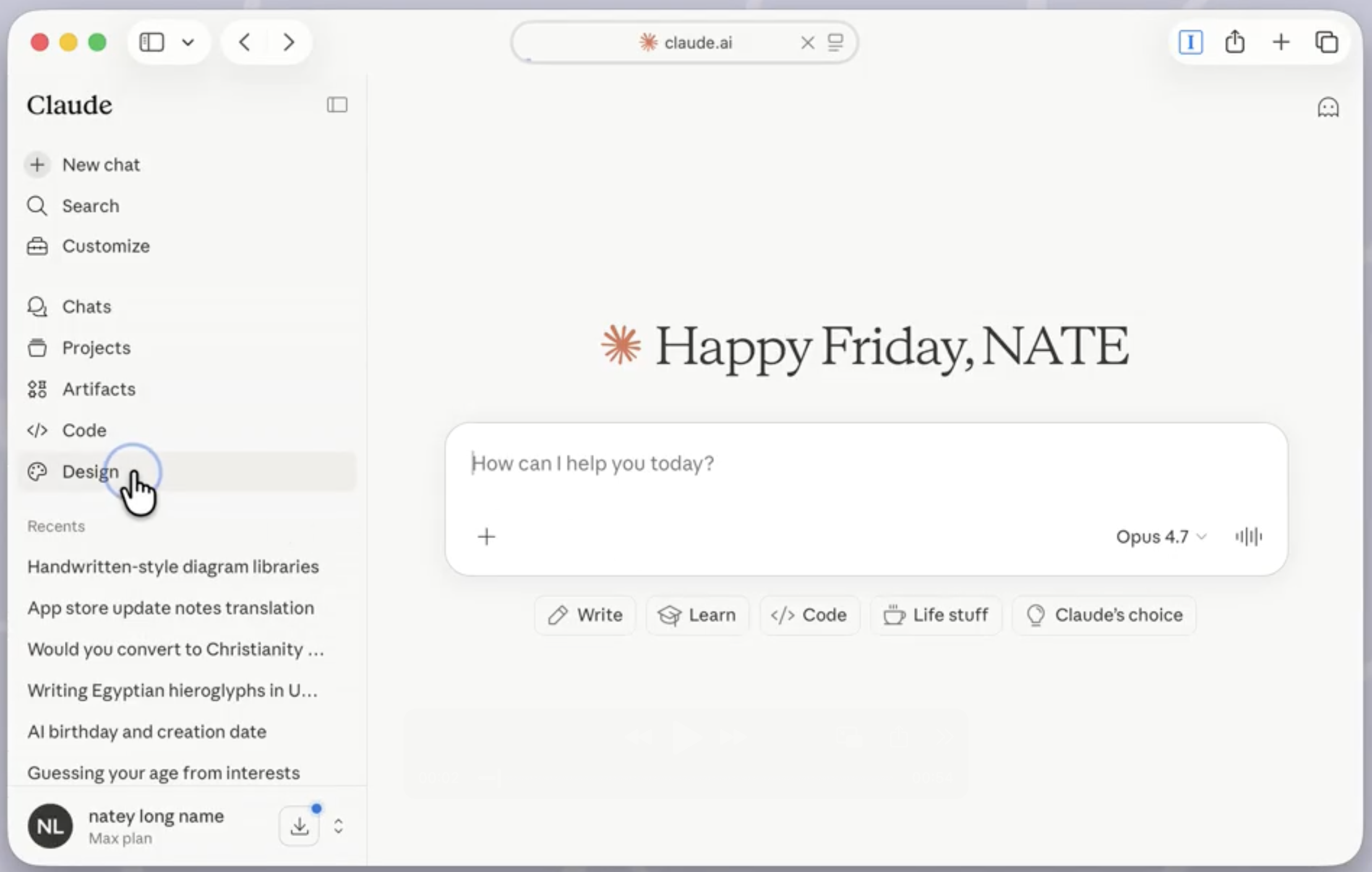
Claude Design is a standalone product inside claude.ai. You describe what you want, Claude builds a real visual artifact — not a wireframe, not ASCII art, an actual rendered screen or slide you can live-preview, edit, and export.
It can make:
- Prototypes — mobile app screens, landing pages, product UI mockups
- Slide decks — full presentations, exportable as PPTX or sent to Canva
- One-pagers — pitch pages, product briefs, memos
- Marketing pages — hero sections, feature grids, landing layouts
The pitch: you're not opening a design tool to start. You're opening a chat. Claude does the design.
Who it's for
Anthropic is explicit about the target: founders and product managers without a design background. People who have an idea but don't open Figma to start.
In practice, that's:
- A solo founder who needs a pitch deck by Friday
- A PM who wants a prototype to align engineering around
- A marketer spinning up a one-pager for a campaign
- Anyone who's ever typed “make this look better” into ChatGPT and gotten slop
If you're already a professional designer, this isn't replacing your tool. It's for the first 80% — getting from idea to something shareable quickly.
How to access it
Log into claude.ai
Go to claude.ai and sign in. You need a Pro ($20/mo), Max ($100/mo), Team, or Enterprise plan — the free tier doesn't have Design yet.
Open claude.ai/design
Navigate directly to claude.ai/design. It's labeled as a “research preview” product — separate from the main chat UI.
Pick a starting point
You'll see a prompt box and optionally a few starter categories: Prototype, Slides, One-pager, Marketing page. You can pick one, or just describe freely — Claude figures out the format.
Your first design: a meditation app
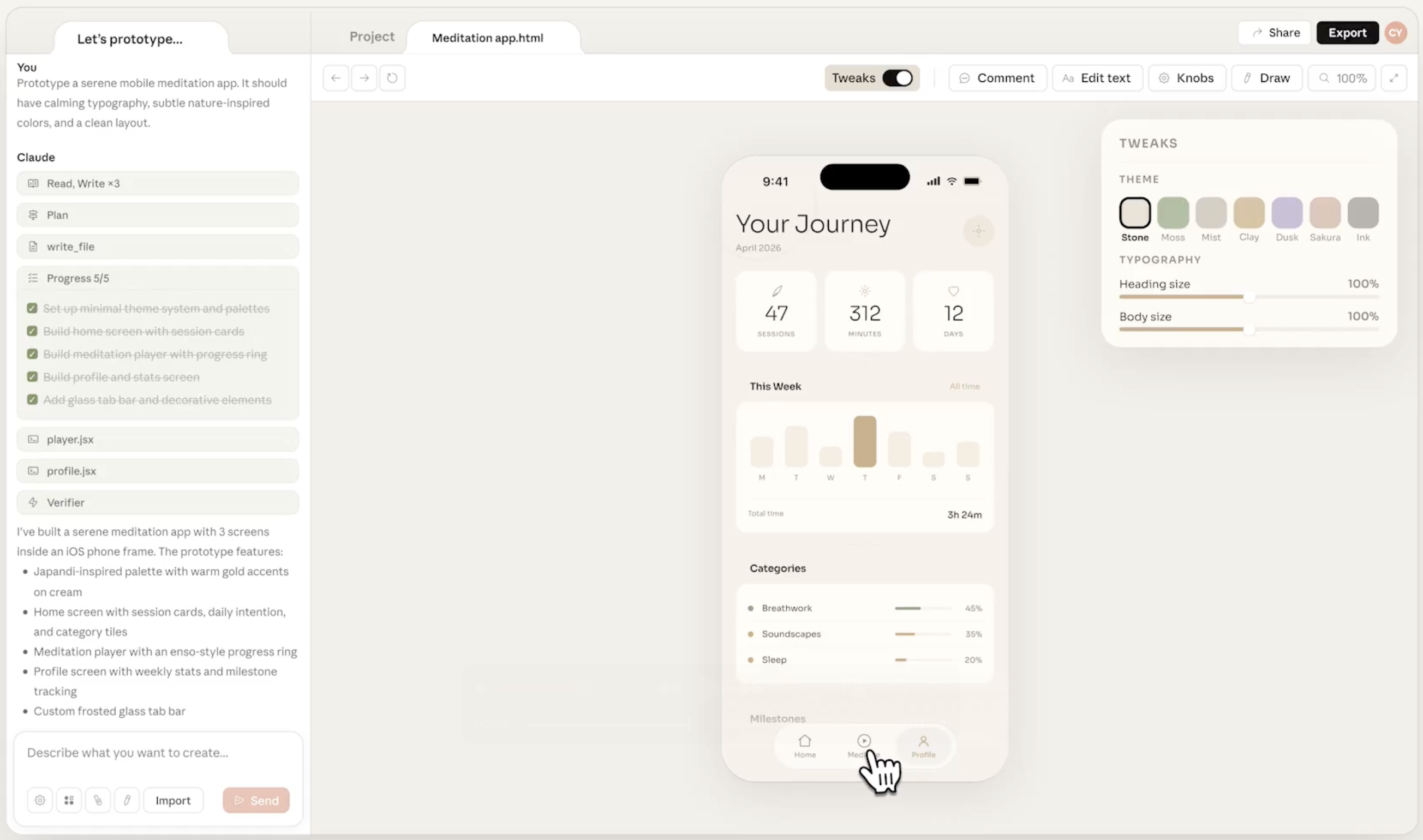
Use Anthropic's own example from the launch. This is a good first prompt because it has clear mood, typography, and color direction built in:
Prototype a serene mobile meditation app. It should have calming typography, subtle nature-inspired colors, and a clean layout with three main screens: home, a guided session, and a progress tracker.Hit enter. Claude will think for a few seconds, then render a real interactive prototype on the right — three phone-frame screens you can click through.
Refining the output
The first output is rarely the final one. You have two ways to iterate:
Chat to refine
Just keep the conversation going. Tell Claude what to change:
Make the home screen use warmer, sunset-inspired colors instead of cool blues. Also increase the padding between the three main CTAs.Direct edits
You can also click elements in the live preview and edit text or swap colors directly — like you would in Figma. No prompt needed for small tweaks.
A rhythm that works: prompt for big moves, click for polish. Use chat to restructure or change the vibe. Use direct edits to fix a typo or nudge a color.
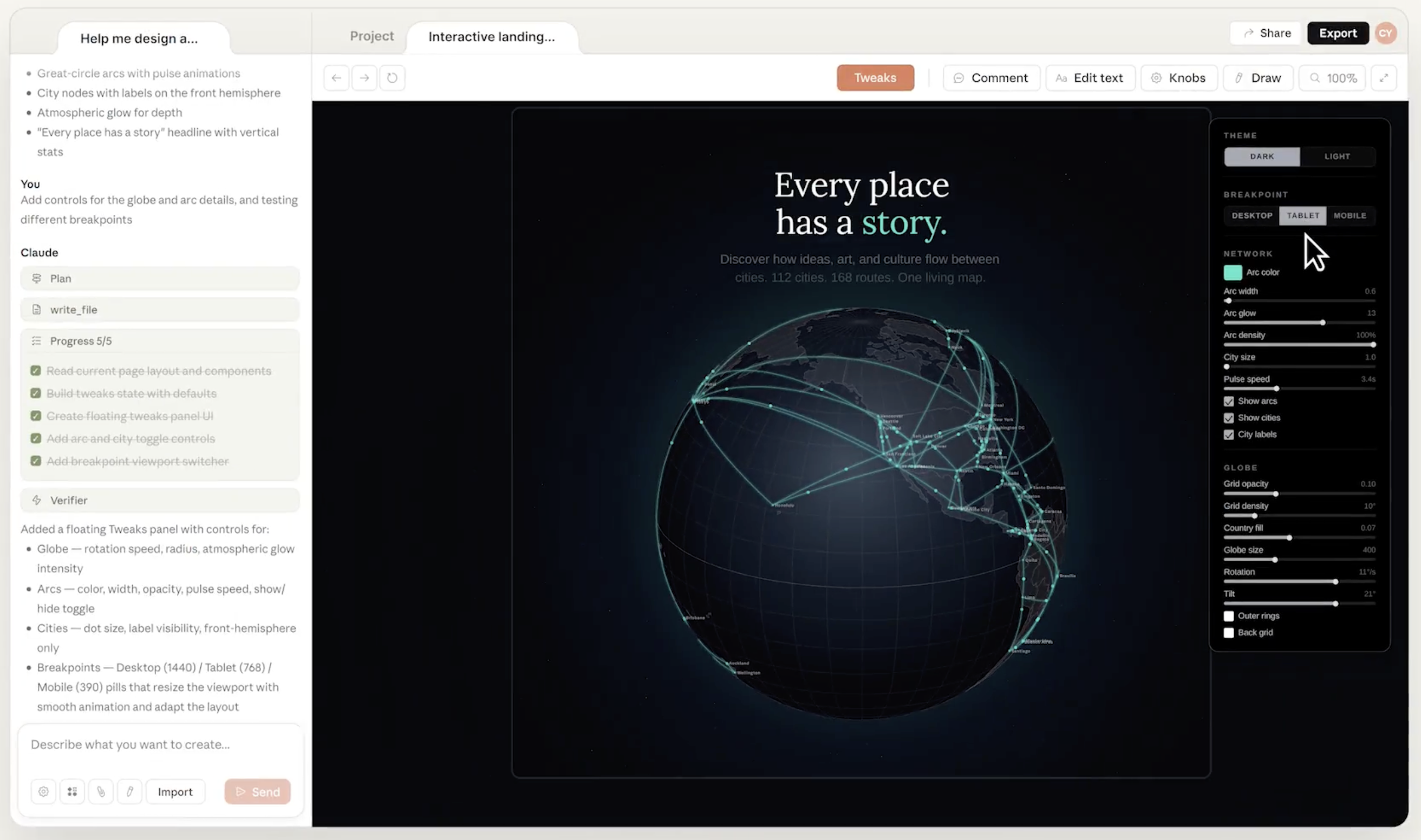
The Knobs panel is one of Claude Design's sharpest features: Claude exposes the key parameters of whatever it built — colors, speeds, sizes, densities — as live sliders and toggles. You tune the result without another round-trip to the chat.
Applying your brand or design system
This is the feature that separates Claude Design from every other “AI that makes slides” tool. Claude can read your company's codebase and design files and apply your actual design system to everything it generates.
That means real brand colors, real typography tokens, real component patterns — not a generic “clean modern” look.
To set this up:
Connect your design source
Point Claude Design at a GitHub repo (for a codebase) or upload your design files. It will extract your tokens: colors, fonts, spacing, component styles.
Tell Claude to use it
Apply our design system to this one-pager. Use our brand colors, typography, and button styles.Every subsequent output in that project will follow the system. You can maintain multiple design systems — one for your product, one for your marketing site, etc.
Exporting to PDF, PPTX, or Canva
Once you're happy with the result, you have four export paths:
- PDF — good for one-pagers, read-only handoffs
- URL — share a live link that anyone can open in the browser
- PPTX — download a PowerPoint file that opens in Keynote, PowerPoint, or Google Slides
- Send to Canva — opens the design in Canva, fully editable and collaborative with your team
The Canva path is the interesting one. Claude Design and Canva are positioned as complementary, not competitive. Claude generates the first version. Canva handles the collaborative editing, brand kits, and publishing workflow you already have.
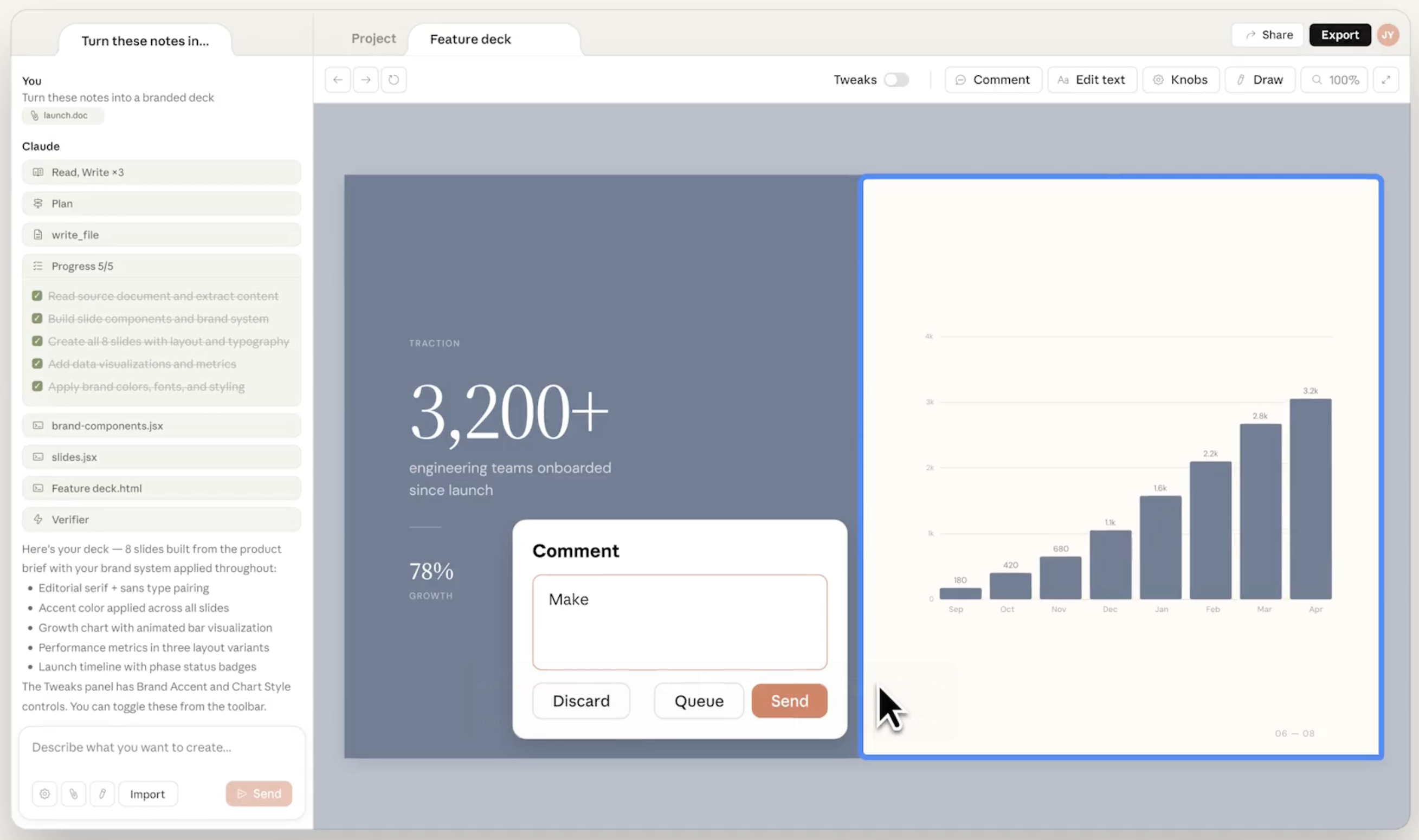
Decks ship with live charts, real typography, and your brand colors baked in — no placeholder Lorem Ipsum. The Comment tool lets you queue up feedback inline and send it all at once instead of peppering Claude with one-off tweaks.
6 tips straight from the product
Claude Design's onboarding walks you through six cards. They're short, but each one names a feature that's easy to miss if you dive straight in. Worth internalizing before you start:
Mock it up
Design mode starts with quick wireframe explorations before committing to high fidelity. Say what the screen does, not what it should look like, and Claude sketches options. Pick one, then push it toward fidelity.
Bring your context
Drop images, paste screenshots with ⌘V, or drag in a Figma file. Mount a local folder from the Import menu so Claude reads your codebase live — that's how it picks up your real components and tokens instead of making up a design system.
Point at what to change
Click Comment in the toolbar, then click any element to annotate it. Leave several at once — they batch into a single message when you send, which saves you from the one-tweak-at-a-time chat spiral.
Tweak values live
Knobs mode lets you drag CSS values — sizes, colors, spacing — directly in the preview. Dial it in visually, then prompt Claude to apply your adjustments. Much faster than “make the padding a bit bigger, no smaller, no between those two.”
Hand off to engineering
Use Handoff to Claude Code to package specs and structure into a dev-ready folder. Download it, switch to Claude Code, and tell it “create this design.” That's the bridge from design artifact to shipped code.
Save it as a template
Turn any project into a Template so every new project starts on-style. Just ask Claude to “save this as a template.” This is the lighter-weight version of the design-system integration — good for when you've landed a look you want to reuse without formalizing tokens.
5 prompts to steal
Copy any of these, change the subject, and you've got a starting point:
1. Landing page for a B2B SaaS
Design a marketing landing page for a B2B SaaS tool called Ledgerly that does AI-powered bookkeeping. Include a bold hero with one headline and a subhead, a three-column feature section, a pricing table with three tiers, and a dark CTA footer. Clean, confident, slightly financial.2. Pitch deck (10 slides)
Make a 10-slide investor pitch deck for a startup that sells AI-generated birthday videos. Standard structure: title, problem, solution, demo, market size, traction, business model, team, ask, contact. Modern, minimal, lots of whitespace.3. One-pager for a product launch
Create a one-pager announcing the launch of a new AI note-taking app called Scribble. Include the name and tagline, three key features with icons, a screenshot placeholder, pricing, and a QR code placeholder for download. Warm and friendly, not corporate.4. Mobile app prototype
Prototype a mobile fitness app with three screens: a home dashboard showing today's workout, an active workout screen with a timer and exercise list, and a weekly progress view with charts. Bold typography, high contrast, energetic orange and black color palette.5. Internal memo / product brief
Turn this into a clean internal one-pager: a product brief for a new feature called 'Smart Replies' in our email app. Include: the problem, the proposed solution in three bullets, success metrics, risks, and a timeline. Corporate but readable, no clip art.Live showcase: 3 things it made
To see what Claude Design can actually produce from a single prompt, I pushed it on three very different asks: an interactive WebGL backdrop, a live text editor with particle effects, and a tiny rotating globe loader. Each one is the raw HTML file Claude exported — no cleanup, no follow-up prompts.
All three demos running in your browser, with source files you can grab.
- Shader Wallpapers — five interactive WebGL backgrounds with a dock, tweaks panel, and keyboard shortcuts. Download .html
- Text Particle Effects — a live editor where trigger words like “fire”, “electric”, or “snow” conjure styling and particles. Download .html
- Globe Loader — a 200px rotating D3 orthographic globe with orbital rings, as a loading spinner. Download .html
None of these took more than one prompt. That's the bar the tool holds itself to — describe it, get a real, working artifact.
Next steps
- Open claude.ai/design and try the meditation app prompt above.
- Refine it with one chat instruction and one direct edit — get a feel for both rhythms.
- Export it to PPTX and open it locally. See how editable the output actually is.
- If you're on a team, connect your codebase or design files and watch Claude respect your brand tokens.
- Pick one of the 5 prompts above, swap in your actual product, and ship a real artifact by end of day.
Claude Design is still in research preview, which means features and UI will change. But the core loop — describe, preview, refine, export — is the shape of how design tools are going to work from here.
The real shift isn't “AI makes slides.” It's that the blank canvas is gone. You start with something.
Written by
@atareh
AI architect & creator. Writing, designing, and producing in AI and tech. Previously head of product at a healthtech SaaS; background in molecular science. Founded gogray.today in 2017.
Related
Keep reading.
Made by @atareh · x / twitter · instagram